Orxivar
Luma System
Luma System
Couldn't load pickup availability
Self-paced learning overview
- 📥 Digital file available after purchase
- ♾️ Long-term availability
- 🔒 Secure checkout
- 🗓️ Content updated in 2026
1. Problem Statement
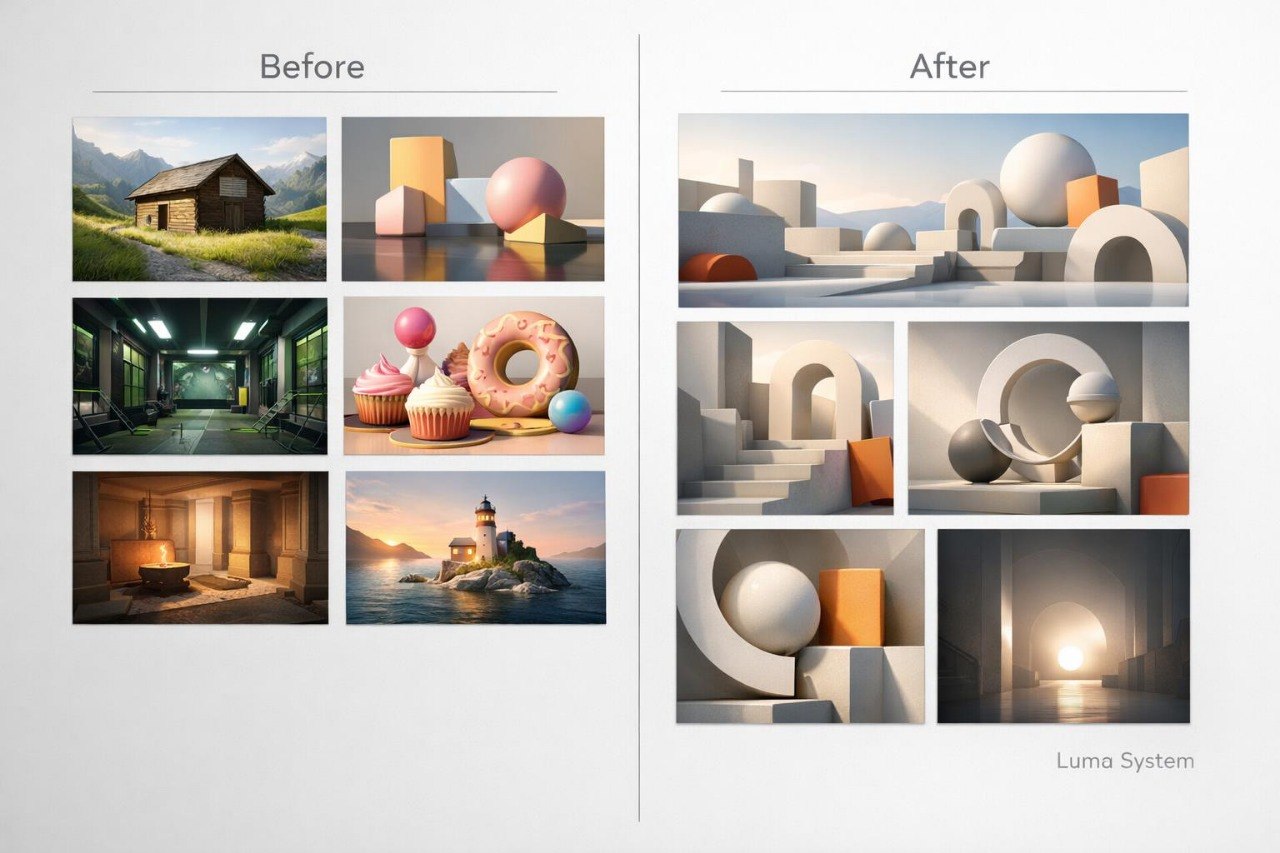
Struggling to connect several 3D scenes into one recognizable visual series? You are not alone: individual frames may appear thoughtfully composed but lose their connection through changing proportions, materials, lighting, or compositional rhythm. When moving between scenes, the main focus can shift, while repeated elements may begin to feel random. Using too many colors and surface types can also weaken the overall structure. Luma System explains how to create a series in which every scene has a separate purpose while remaining part of one visual direction.
2. Solution
This course will teach you to plan a 3D series before developing the details of individual scenes. You will explore how to define a shared system of forms, materials, colors, lighting, and composition rules. Dedicated modules cover visual continuity, recurring motifs, scale variation, and the preparation of different frame types. Practical exercises help you compare scenes and identify elements that interrupt their relationship. For the final project, you will create five connected scenes and prepare a structured presentation of your design decisions.
3. What’s Inside
Module 1: Visual Direction Map
Define the theme, atmosphere, primary forms, and spatial character of the series. This module helps you prepare a visual reference map for all later scenes.
Module 2: Shape Language
Establish a set of geometric principles that will appear across objects and environments. Particular attention is given to angles, rounded forms, proportions, and repeated shape rhythms.
Module 3: Color Relationships
Explore primary, supporting, and accent color groups. You will prepare several palette variations and examine them under different lighting conditions.
Module 4: Material Library
Create an organized group of matte, smooth, textured, and reflective surfaces. The assignment helps you decide which materials remain consistent and which appear only in selected scenes.
Module 5: Lighting Language
Develop shared lighting rules for the complete series. Topics include direction, contrast, temperature, and the placement of illuminated focal areas.
Module 6: Scene Families
Create several scenes with different compositions and one shared visual foundation. The module examines recurring objects, motifs, spacing, and background elements.
Module 7: Scale and Spatial Variation
Study how scale and spatial density can change without weakening the relationship between frames. You will prepare wide, medium, and detail-focused compositions.
Module 8: Narrative Sequence
Arrange the scenes into a readable order. Particular attention is given to the opening frame, transitions between images, and the closing composition.
Module 9: Visual Consistency Review
Compare silhouettes, materials, lighting, color, and compositional rhythm across all scenes. A structured set of criteria helps identify differences that require revision.
Module 10: Presentation Layout
Organize frames, concise explanations, diagrams, and details within a final presentation. You will prepare a readable sequence without overcrowding individual pages.
Module 11: Revision and Refinement
Review object forms, lighting emphasis, material zones, and spatial distances. Each adjustment should have a clear purpose and support the overall system.
Module 12: Luma Visual Series Project
Create five connected 3D scenes for the final assignment. The project includes one wide frame, two medium compositions, one detail-focused view, one atmospheric frame, and a concise explanation of the main design decisions.
4. Who Is This For?
✅ A good fit if you:
- have already created complete 3D scenes;
- understand foundational composition, materials, and lighting;
- want to create a series of connected frames;
- are interested in visual continuity and shape language;
- are ready to plan the series before developing details;
- want to prepare a structured presentation of your work.
❌ Not a fit if you:
- are only beginning to explore 3D visual design;
- have not yet worked with lighting and materials;
- need a brief introductory format;
- do not plan to create several connected scenes;
- require individual guidance for every assignment;
- need materials tied to a named digital environment.
5. What You’ll Learn
After working through the course materials, you will be able to:
- prepare a visual direction map for a series;
- define a shared geometric shape language;
- create primary and supporting color groups;
- organize materials by type and visual role;
- establish lighting rules for several scenes;
- develop connected compositions from different viewpoints;
- vary scale while maintaining visual continuity;
- arrange five scenes in a readable sequence;
- compare frames using defined criteria;
- prepare wide, medium, and detail-focused views;
- explain the main design decisions;
- present a connected 3D visual series.
6. 30-Day Refund Policy
Luma System includes a 30-day period for submitting a refund request under the terms published on the Orxivar website. Requests should be sent within the stated period and include the relevant order details. Learners should review the full policy, request procedure, and possible exceptions before placing an order.
7. Certificate
After completing all required modules and the final visual series, learners receive a digital Orxivar certificate. The document includes the course title and the main topics related to visual direction, lighting, materials, composition, and series development.
1. What format do the courses use?
1. What format do the courses use?
Orxivar courses are divided into ordered modules with written explanations, visual examples, and practical exercises. Learners can study at their own pace and return to earlier topics whenever further review is helpful.
2. Do I need previous 3D visual design experience?
2. Do I need previous 3D visual design experience?
This depends on the selected plan and its curriculum. Introductory plans cover foundational concepts, while broader plans explore detailed scenes, visual structure, and more advanced design topics.
3. How long does a course take?
3. How long does a course take?
The study period depends on your schedule, the number of modules, and the time you dedicate to practice. Topics are arranged in a clear sequence, allowing you to study them in manageable sections.
4. Is a certificate included?
4. Is a certificate included?
Yes. After completing all required sections and assigned activities, learners receive a digital Orxivar certificate showing the name of the completed course.
Share